
Back in 2019, I wrote about using machine groups in Microsoft Defender ATP to automatically resolve investigations on selected systems. The core idea was simple: not every endpoint should be handled the same way, and security teams need a way to apply different remediation behavior to different classes of machines.
That idea still holds up.
What changed is the platform around it.
Microsoft Defender ATP is now Microsoft Defender for Endpoint, Azure AD is now Microsoft Entra ID, Azure ATP became Microsoft Defender for Identity, and MCAS evolved into Microsoft Defender for Cloud Apps. These capabilities now sit under the broader Microsoft Defender XDR platform, which correlates signals across endpoints, identities, email, and cloud applications in the unified Microsoft Defender portal.
Microsoft documents the modern architecture in its overview of Microsoft Defender XDR and the unified security portal
The names changed. The UI changed. The security stack matured.
But the operational problem did not.
You still need a way to let automation move fast on lower-risk endpoints, keep tighter control on sensitive systems, and scope who can see and act on different parts of your environment.
That is what device groups in Microsoft Defender for Endpoint are designed to do.
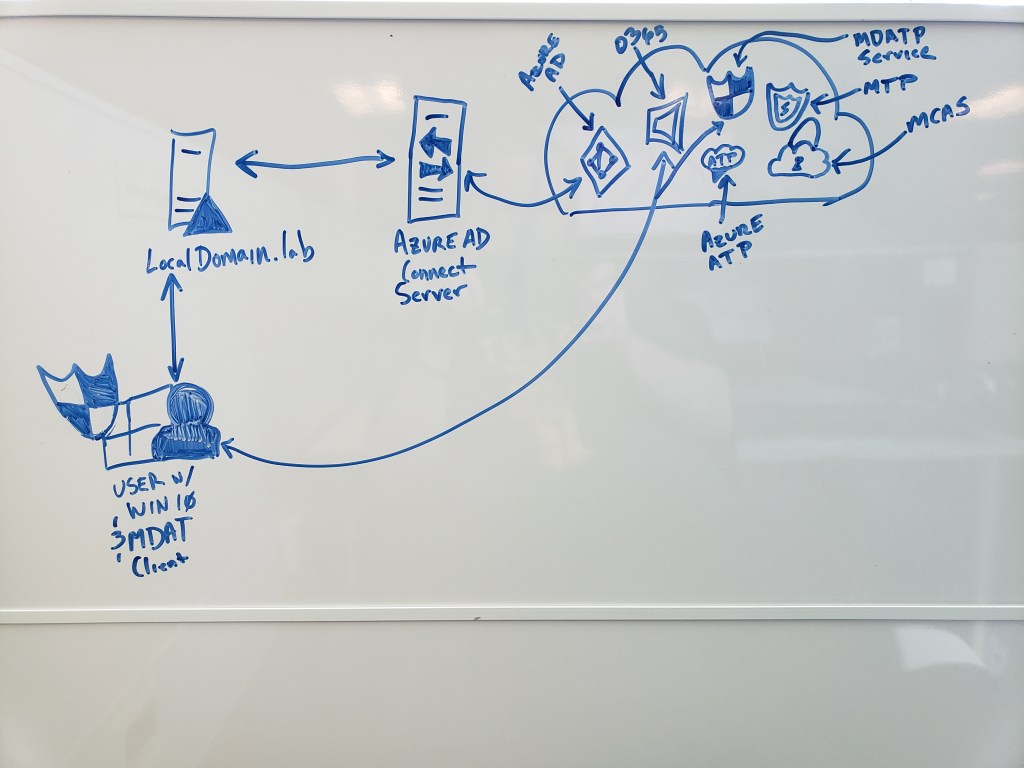
Local AD → Microsoft Entra ID → Defender services → Microsoft Defender XDR.
Why Device Groups Still Matter
In a real enterprise environment, not all endpoints are equal.
- User workstations
- Privileged admin workstations
- Lab machines
- Executive laptops
- Domain controllers
- Business-critical servers
Each of these has a different operational risk profile.
Treating them with a single global automation policy sounds simple, but usually leads to problems in production.
Microsoft’s device groups capability in Microsoft Defender for Endpoint allows organizations to:
• limit access to alerts and device data through Microsoft Entra RBAC
• apply different automated investigation and remediation levels
• scope device visibility to specific teams
• assign device groups based on name, domain, OS, or tags
• prioritize groups when devices match multiple rules
Microsoft documents this behavior in the official device groups configuration guidance for Defender for Endpoint
This makes device groups more than a simple categorization feature. They become a policy control surface for automated response.
How This Fits the Modern Microsoft Security Model
Today, Microsoft’s security platform is structured around Microsoft Defender XDR, which correlates signals across multiple security domains.
Microsoft describes how incidents are investigated across endpoints, identities, email, and applications in the Defender XDR incident investigation workflow
Within that model:
• Microsoft Defender for Endpoint contributes endpoint telemetry and remediation
• Microsoft Defender for Identity monitors identity-based attacks
• Microsoft Defender for Cloud Apps provides SaaS and cloud-app visibility
• Microsoft Entra ID anchors identity and access signals
Together, these services feed incidents and investigations in the Defender XDR portal.
Device groups determine how aggressively automated remediation actions occur when Defender for Endpoint detects threats on a device.
Before You Configure Device Groups
Before implementing automated remediation policies, make sure the core platform prerequisites are in place.
Automated investigation and response require Microsoft Defender Antivirus running in active or passive mode. Microsoft outlines these requirements in the official documentation for automated investigation and response capabilities in Defender for Endpoint
If Defender AV is disabled or removed, automated remediation features will not function correctly.
In addition, Microsoft recommends deploying the platform through a structured pilot rollout, which includes dedicated test devices and evaluation groups. This approach is described in Microsoft’s pilot deployment guidance for automated investigation and response
Microsoft’s Recommended Automation Model
Microsoft’s documentation currently recommends using Full automated remediation where appropriate.
The available remediation levels are documented in the automation levels reference for Defender for Endpoint
These include:
• No automated response
• Semi – approval required for all folders
• Semi – approval required for non-temporary folders
• Semi – approval required for system folders
• Full remediation
Microsoft’s recommendation is clear.
Start with Full remediation for devices where automatic containment is acceptable.
However, many real-world security teams phase toward this model gradually.
For sensitive systems, administrators may initially choose one of the semi-automated modes until the organization builds confidence in how automated remediation behaves in their environment.
This reflects operational maturity rather than disagreement with Microsoft guidance.
Creating Device Groups in Microsoft Defender
Device groups are configured in the Microsoft Defender portal at
https://security.microsoft.com
To configure them:
Navigate to Settings → Endpoints → Permissions → Device groups
Microsoft documents the full configuration workflow in the device groups management documentation for Defender for Endpoint
Step 1 — Create a device group
Select Add device group and provide a descriptive name.
Use names that reflect the operational model rather than just technical attributes.
Examples:
- Workstations-FullAutomation
- Servers-ApprovalRequired
- Tier0-PrivilegedDevices
- Pilot-AutomationRing
Step 2 — Select the remediation level
Choose the appropriate remediation level for the device group.
Microsoft describes these options in its automated remediation policy guidance
Use Full remediation where automation risk is acceptable.
Use Semi modes where human approval is required for certain actions.
Step 3 — Define device membership rules
Devices can be grouped using:
• device name
• domain
• OS platform
• device tags
Microsoft documents these matching rules in the device grouping rule configuration guidance
In modern deployments, device tags are usually the most flexible option, because they allow administrators to group systems by business function or security tier rather than operating system.
For example:
- Pilot-Devices
- Tier0-AdminWorkstations
- Engineering-Lab
- Executive-Endpoints
Step 4 — Assign access through Microsoft Entra groups
Device groups also integrate with Microsoft Entra RBAC, allowing organizations to control which security teams can see and act on specific devices.
Microsoft describes this integration in the RBAC documentation for Defender for Endpoint device groups
This allows SOC teams, regional administrators, or specialized security teams to operate within defined scopes.
Step 5 — Review group ranking
If a device matches multiple device groups, Defender assigns the device to the highest-priority group.
Microsoft explains this priority behavior in the device group ranking documentation
This detail matters more than it appears at first glance, especially in large environments.
How Automated Investigation Works in Defender XDR
Once device groups and remediation policies are configured, automated investigation and response (AIR) can begin analyzing alerts.
Microsoft describes this capability in the documentation for automated investigations in Microsoft Defender XDR
AIR functions as a virtual analyst that:
• investigates alerts
• analyzes evidence
• determines verdicts
• performs remediation actions
• records actions in the Action Center
Depending on the automation level configured in the device group, those remediation steps may occur automatically or require analyst approval.
The Bigger Picture: Microsoft Defender XDR
In modern deployments, automated investigation is only one part of the response story.
Microsoft Defender XDR correlates signals across endpoints, identities, email, and applications to create unified security incidents.
Microsoft explains this cross-domain incident model in its overview of incident investigation and response in Defender XDR
More recently, Microsoft has also introduced automatic attack disruption, which can automatically contain active attacks across identities and endpoints when high-confidence signals are detected.
Final Thoughts
The core lesson from the original 2019 article still applies.
Security automation should not be applied uniformly across every device.
Instead, organizations should define logical groups of devices and align remediation behavior with operational risk.
Back then, that concept lived in MDATP machine groups.
Today, it lives in device groups within Microsoft Defender for Endpoint, operating as part of the larger Microsoft Defender XDR platform.
Different names. More integrated platform.
 Tech That MattRs
Leave a comment