
I talk a lot about identity, attribution, scope, and evidence.
This was me actually using those principles in my own stack.
Not in a lab. Not in a vendor diagram. Just my actual working mess: Google Docs, Asana, Slack, ChatGPT, Claude, a couple of bot accounts, a few connectors, and the creeping realization that my workflow was starting to lie to me a little.
Not maliciously. Systems usually do not need to be malicious to make the record weird.
They just smooth over the parts that matter.
The log was starting to lie
The first problem was not access.
That feels backwards, because access is the part everyone wants to talk about. Can the account open the file? Can it update the task? Can it post the message? Can it see the project?
Those questions matter. They just were not the thing that made me stop and fix the setup.
The thing that bothered me was attribution.
I was using ChatGPT against tools I actually use. Google Docs. Asana. Slack. The work was real enough to matter, but the activity trail still wanted to collapse everything into me.
That is fine when the AI is only advising a chat window. It gets less fine when the workflow starts touching systems.
If a task changed, the trail needed to show who changed it. If a document was edited, I wanted to know which identity made the change. If work moved forward through an AI-assisted path, I wanted the record to show that path instead of quietly laundering it through my personal account like a tiny audit fog machine.
The problem was not that the AI could help do the work.
The problem was that the log made it look like I did it all.
That is the record lying by simplification.
And once I saw it, I could not unsee it.
So I gave the AI its own identity
The fix was smaller than the language makes it sound.
I created a separate operator account. I connected that account to the tools I actually use. Then I stopped pretending my personal account was a clean control point for every AI-assisted action.
That was it.
One extra identity. A handful of connector changes. Some MFA prompts. Some sharing cleanup. A little spelunking through settings that were clearly not designed around the phrase, “I would like to swap the acting identity for my AI operator identity, please and thank you.”
Asana was where I was managing the work, so that is where the attribution problem had to become real first. I added the bot as another user in the workspace, verified the identity, and used a real task instead of a fake test. If a task changed, I wanted the record to show which identity changed it.
Google Docs was not secondary. Every WordPress post was in Google Docs first. That was the primary drafting surface, and it is also where the access boundary showed up later. Seeing the document in Asana did not mean the acting identity could actually open it. MFA stayed on. That lines up with the NIST Digital Identity Guidelines, but the practical version is simpler: if an identity can touch real work, do not make it easy to compromise.
Slack started as plumbing. Then the Asana notifications started showing up there, and it became the place where the visible side effects accumulated.
One habit I would keep: verify the active identity at the start of any session where the tool path matters.
Do not assume the connector is using the account you meant to use.
Check it. Then act.
That sounds obvious right up until it is not.
The first win was boring
The first useful result showed up in Asana (of course).
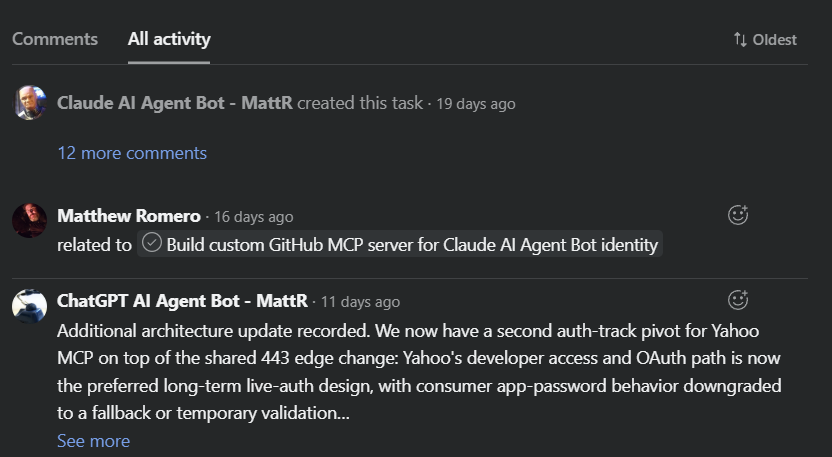
I had the bot update and complete a real task. The activity trail got cleaner immediately. The bot account showed up as the actor.
That alone made the exercise worth doing.
Not because the action was impressive. Updating a task is not exactly moon landing material. But the record finally started admitting which path the work had taken.
Then there was the second win, which was just as important. Once the operator had its own real Asana identity, some actions became more usable in practice. The operator could comment on tasks cleanly as itself.
That sounds small until you need the log to make sense later.
Attachment visibility is not access
I attached a draft outline to the Asana task and tried to open it through the bot identity. Asana could see the attachment reference just fine.
The bot still could not open the document.
Permission denied.
That was useful. Annoying, but useful.
A system knowing about a file is not the same thing as an identity having permission to open the file. The attachment existed in one system. The access boundary lived in another.
After I fixed sharing, the bot could open the doc, edit it, and show up in version history as its own actor.
That was one of the cleanest proof points in the whole exercise because it separated system awareness from actual access.
This is the same thread I pulled on in RAG Is Data Access: Retrieval Authorization Is the Control. The boundary that matters is not the UI label, not the attachment reference, and not the fact that some system can point at a thing. The boundary is whether this identity can actually retrieve, open, use, or change it.
That is why this small test felt familiar against the broader Zero Trust model. NIST SP 800-207 is not about trusting a location or a happy path. It is about evaluating access to resources explicitly.
Small lab. Same old control plane.
A name in the log is not a boundary
A separate identity did not magically mean a narrow scope.
Once connected, the bot could still see more than just its own assigned tasks. In Asana, visibility followed workspace and project permissions, not assignment alone. That was fine in a small environment where I was deliberately testing the flow. It would be a different conversation in a larger workspace with real teams, real customer data, and real blast radius.
Distinct attribution and least privilege are related.
They are not the same thing.
A separate operator identity is step one. Scope control is step two.
That is the part people skip when identity becomes a label. A name in the log is helpful. A name in the log is not a boundary.
CISA’s Zero Trust Maturity Model is useful here because it treats visibility, policy, and least-privilege progress as related work, not interchangeable work. That matters. You do not get least privilege just because the actor has a better name tag.
Posting a command is not executing one
Slack clarified another thing that sounds obvious until you test it.
The operator could read the test channel, search it, post to it, and watch Asana traffic land there. But executing a slash command? No dice.
It posted text.
That is a specific capability. Executing a slash command would have been a different capability with a different trust boundary.
This is where high-level AI governance talk gets mushy. “The agent can use Slack” is not precise enough. Can it post? Can it read? Can it invoke commands? Can it trigger workflow automation? Can it impersonate? Can it install apps? Those are different verbs. Different risks. Different receipts.
An accepted action is not the same as a useful result
Asana email routing taught a similar lesson from a different angle.
The first route was wrong. The system accepted the action anyway and created the wrong kind of object to be any kind of useful without objection. That did not mean the workflow was correct. It meant the connected identity had enough permission to act through its own mailbox, even though the result was not that useful.
That detail matters. The mailbox was the agent’s, not a human’s. This was not a case of the system reaching into somebody else’s mail. It was still privileged access, but it was privileged access inside the agent’s own mailbox, which is a much cleaner boundary than giving that same access to a human account with mixed-purpose mail.
After correcting the route, the project email path could create a real task with most of the needed details already in place, and the connector could clean it up afterward. Not elegant. But still usable.
Receipts create noise
Once the operator started doing real work in Asana, the connected Slack channel lit up.
Rename a task, change a description, shift an assignment, close work, and the chatter starts piling up. That made the test channel more than a gimmick. It became somewhere for that noise to land.
Better receipts can create more noise.
That is not a reason to avoid the receipts. It is a reason to design the notification boundary on purpose. The workflow needed a place for signals to land without turning the whole workspace into a popcorn machine.
That is also where the next problem starts.
Once the actor is distinct, the next question is what each action needs to leave behind. Identity gives the work a name. Receipts tell you what actually happened.
That deserves its own post, because logs, traces, audit evidence, and retained receipts are related, but not identical. For this exercise, the important point was simpler: the identity layer made the work more honest, and that made the evidence problem harder to ignore.
Two AI identities made the seams obvious
Later, I realized I had only done this properly for GPT. Claude was still living in the older fuzzy arrangement, so I gave it a separate identity too.
That made the experiment more useful. By the end, two AI systems were operating in the same Asana workspace, on the same project, toward the same goal, and the record showed them as different actors. Claude updated a subtask. GPT added a comment. I created some subtasks manually where the tool surface still had limits. Three distinct actors. One honest record.
Most AI-assisted work collapses all of that into one human name. Convenient for the UI. Bad for the record.
It also showed that different AI systems do not have the same action surface. GPT and Claude had different connector behavior, different account constraints, and different gaps. Claude did not have the same email path in this stack, so email stayed manual until I started building a separate MCP path for it. Claude could update subtasks once they existed, but creating them cleanly was unreliable enough that I still had to bridge part of that work by hand.
Same principle. Uneven tooling. Better record.
Identity, permission, and presentation do not update together
One of the smaller wrinkles was display naming.
I changed the operator identity’s display name to make the logs read better. Some surfaces picked it up faster than others. Permissions, edit capability, activity records, and visible presentation did not move together.
Identity, permission, and presentation do not update on the same clock.
That is not a hard rule; it is just the kind of thing you notice when you actually run the setup and watch different systems catch up at different speeds.
The old identity questions show up early:
Who is acting?
What can this identity see?
What can it change?
What does the log actually say?
Where is the evidence?
Who owns this identity and its scope over time?
Those are not enterprise-only questions. They are identity questions. Enterprise scale just makes the blast radius bigger and the cleanup more expensive.
What I would keep
I would absolutely keep the separate operator identity. I would keep MFA on. I would verify the active identity at the start of any session where the tool path matters. I would still start with Asana and Google Docs because they surfaced the most useful lessons first, and I would plan for notification containment earlier.
I would also go in expecting the setups to share principles and diverge in affordances. That is not failure. That is integration work.
This whole exercise also proved something quieter: the test task stopped being a test task. It turned into real implementation and documentation work. Testing is work, especially when the workflow is still deciding what kind of object it wants to create.
The smallest useful AI identity program is still identity work
You do not need enterprise scale before this becomes worth doing.
You just need enough AI-assisted reach that the record starts smoothing over who really did what.
Once that starts happening, the old identity questions are already in the room.
The lesson here is not that solo operators need enterprise bureaucracy. It is that the moment an AI-assisted identity can work across your tools, the actor needs a name, the scope needs a boundary, and the activity trail needs to tell the truth.
You can answer those questions while the setup is still small, or wait until the fuzziness is big enough to hurt.
If this problem feels familiar, read Agent Inventory and the Agent Register next. Giving the acting identity a name is step one. Keeping track of what those identities are, what they can touch, and who owns them is the next part that gets real.
Related reading
The Workflow Got Faster. The Record Got Fuzzier
Why faster systems and cleaner interfaces can still leave the record less truthful, and why that matters once work starts moving across tools.
RAG Is Data Access: Retrieval Authorization Is the Control
Why retrieval boundaries matter more than UI labels, and why a system pointing at a document is not the same as having permission to use it.
Agent Inventory and the Agent Register
The inventory and ownership layer that starts mattering as soon as the acting identity has a name, scope, and real reach.


Leave a Reply